

How to Disable Real-Time Protection in Windows Defender

smookyvac
Cursor

c++ / windows kernel student

Posts

390

Likes

187

Points

34,309

Step 1 — Open Windows Security​


  • Press Windows Key
  • Type: Windows Security
  • Open the app
1778632972512.png


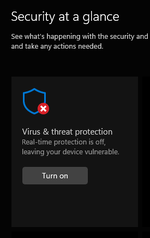
Step 2 — Access Virus & Threat Protection​


  • Click Virus & threat protection
1778633021398.png


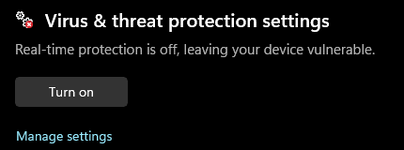
Step 3 — Manage Settings​


  • Under Virus & threat protection settings
  • Click Manage settings
1778633102447.png


Step 4 — Disable Real-Time Protection​


  • Find Real-time protection
  • Toggle it OFF
1778633123518.png
 

Attachments

  • 1778633001940.png
    1778633001940.png
    15.3 KB · Views: 2
  • 1778633036817.png
    1778633036817.png
    9.6 KB · Views: 2
Back
Top